
Samba Version 4.18.8
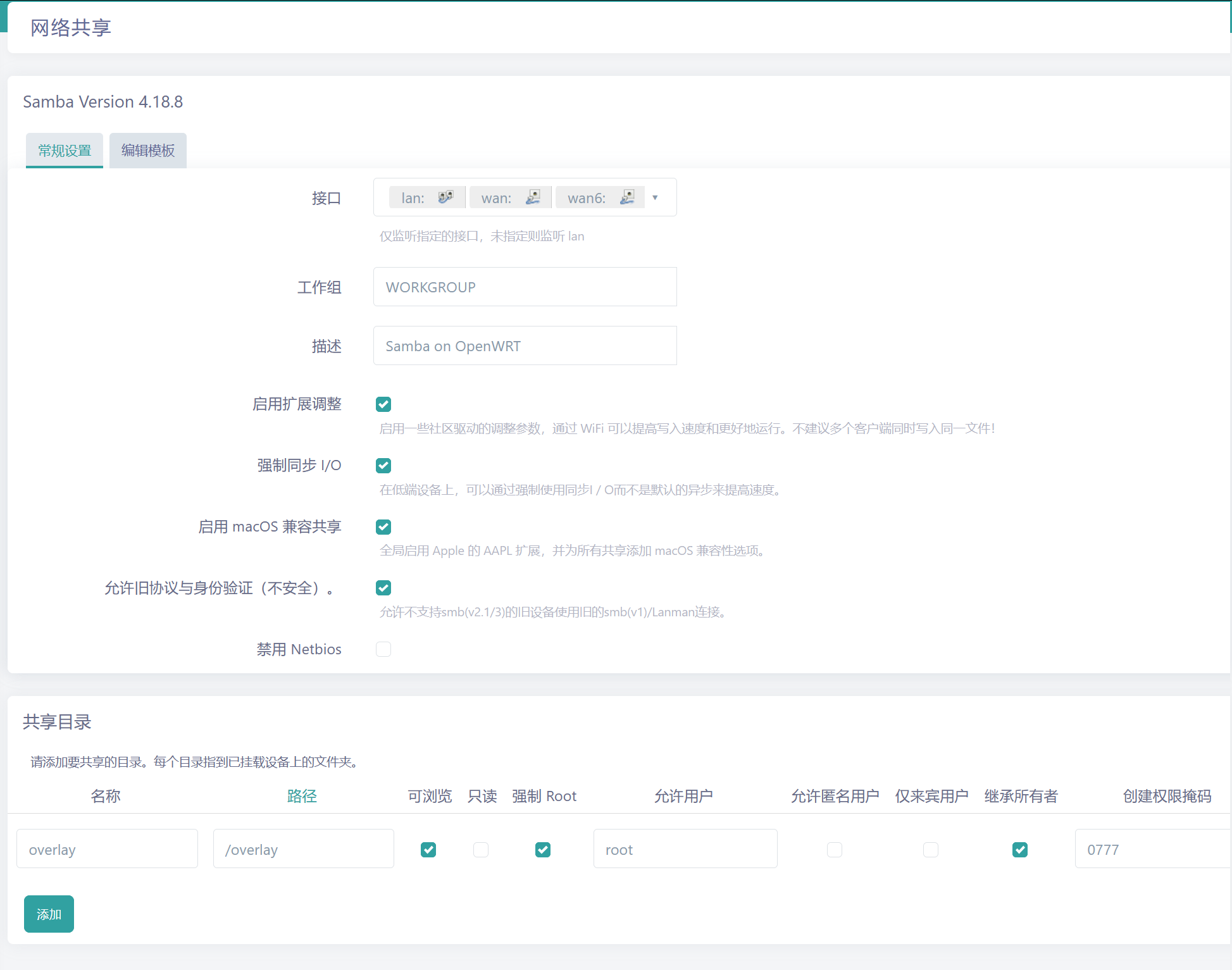
设置共享目录共享目录
请添加要共享的目录。每个目录指到已挂载设备上的文件夹。
名称 overlay 路径 /overlay 允许用户 root
设置用户认证
添加系统用户并设置密码:
创建专用用户(如qq395012428)并设置Samba密码:
useradd -M -s /bin/false qq395012428 # 创建无登录权限用户
smbpasswd -a qq395012428 # 设置Samba密码(输入两次)(因为只是内网访问无安全问题,我直接用的root 然后密码也是我常用的)
密码需与系统密码区分。
2. 指定访问用户:
在/etc/config/samba的共享配置中添加:
option valid_users 'sambauser
配置地址: root/etc/samba/smb.conf
(samba 服务器禁用 guest 登录(推荐)修改 samba 服务器配置
# sudo vim /etc/samba/smb.conf
找到以下行:map to guest = bad user
改为:
map to guest = never
保存后,输入 /etc/init.d/samba4 restart 命令重启 samba 服务器)
通过 SSH 命令行重启
如果你可以通过 SSH 连接到你的 OpenWrt 设备,可以使用以下命令:
使用 SSH 客户端连接到你的 OpenWrt 设备。
执行重启命令:
对于 Samba 4: /etc/init.d/samba4 restart 对于 Samba 3: /etc/init.d/samba restart
SAMBA 地址 \\192.168.111.1\overlay SMB账号 root 密码: 就是刚刚设置的密码
配置文件:
[global]
    netbios name = |NAME|
    interfaces = |INTERFACES|
    server string = |DESCRIPTION|
    unix charset = |CHARSET|
    workgroup = |WORKGROUP|

    ## This global parameter allows the Samba admin to limit what interfaces on a machine will serve SMB requests.
    bind interfaces only = yes

    ## time for inactive connections to-be closed in minutes
    deadtime = 15

    ## disable core dumps
    enable core files = no

    ## set security (auto, user, domain, ads)
    security = user

    ## This parameter controls whether a remote client is allowed or required to use SMB encryption.
    ## It has different effects depending on whether the connection uses SMB1 or SMB2 and newer:
    ## If the connection uses SMB1, then this option controls the use of a Samba-specific extension to the SMB protocol introduced in Samba 3.2 that makes use of the Unix extensions.
    ## If the connection uses SMB2 or newer, then this option controls the use of the SMB-level encryption that is supported in SMB version 3.0 and above and available in Windows 8 and newer.
    ## (default/auto,desired,required,off)
    #smb encrypt = default

#    ## set invalid users
#    invalid users = root

    ## map unknow users to guest
    map to guest = Bad User

    ## allow client access to accounts that have null passwords.
    null passwords = yes

    ## The old plaintext passdb backend. Some Samba features will not work if this passdb backend is used. (NOTE: enabled for size reasons)
    ## (tdbsam,smbpasswd,ldapsam)
    passdb backend = smbpasswd

    ## Set location of smbpasswd ('smbd -b' will show default compiled location)
    #smb passwd file = /etc/samba/smbpasswd

    ## LAN (IPTOS_LOWDELAY TCP_NODELAY) WAN (IPTOS_THROUGHPUT) WiFi (SO_KEEPALIVE) try&error for buffer sizes (SO_RCVBUF=65536 SO_SNDBUF=65536)
    socket options = IPTOS_LOWDELAY TCP_NODELAY

    ## If this integer parameter is set to a non-zero value, Samba will read from files asynchronously when the request size is bigger than this value.
    ## Note that it happens only for non-chained and non-chaining reads and when not using write cache.
    ## The only reasonable values for this parameter are 0 (no async I/O) and 1 (always do async I/O).
    ## (1/0)
    #aio read size = 0
    #aio write size = 0

    ## If Samba has been built with asynchronous I/O support, Samba will not wait until write requests are finished before returning the result to the client for files listed in this parameter.
    ## Instead, Samba will immediately return that the write request has been finished successfully, no matter if the operation will succeed or not.
    ## This might speed up clients without aio support, but is really dangerous, because data could be lost and files could be damaged.
    #aio write behind = /*.tmp/

    ## lower CPU useage if supported and aio is disabled (aio read size = 0 ; aio write size = 0)
    ## is this still broken? issue is from 2019 (NOTE: see https://bugzilla.samba.org/show_bug.cgi?id=14095 )
    ## (no, yes)
    #use sendfile = yes

    ## samba will behave as previous versions of Samba would and will fail the lock request immediately if the lock range cannot be obtained.
    #blocking locks = No

    ## disable loading of all printcap printers by default (iprint, cups, lpstat)
    load printers = No
    printcap name = /dev/null

    ## Enabling this parameter will disable Samba's support for the SPOOLSS set of MS-RPC's.
    disable spoolss = yes

    ## This parameters controls how printer status information is interpreted on your system.
    ## (BSD, AIX, LPRNG, PLP, SYSV, HPUX, QNX, SOFTQ)
    printing = bsd

    ## Disable that nmbd is acting as a WINS server for unknow netbios names
    #dns proxy = No

    ## win/unix user mapping backend
    #idmap config * : backend = tdb

    ## Allows the server name that is advertised through MDNS to be set to the hostname rather than the Samba NETBIOS name.
    ## This allows an administrator to make Samba registered MDNS records match the case of the hostname rather than being in all capitals.
    ## (netbios, mdns)
    mdns name = mdns

    ## Clients that only support netbios won't be able to see your samba server when netbios support is disabled.
    #disable netbios = Yes

    ## Setting this value to no will cause nmbd never to become a local master browser.
    #local master = no

    ## (auto, yes) If this is set to yes, on startup, nmbd will force an election, and it will have a slight advantage in winning the election. It is recommended that this parameter is used in conjunction with domain master = yes, so that nmbd can guarantee becoming a domain master.
    #preferred master = yes

    ## (445 139) Specifies which ports the server should listen on for SMB traffic.
    ## 139 is netbios/nmbd
    #smb ports = 445 139

    ## This is a list of files and directories that are neither visible nor accessible.
    ## Each entry in the list must be separated by a '/', which allows spaces to be included in the entry. '*' and '?' can be used to specify multiple files or directories as in DOS wildcards.
    veto files = /Thumbs.db/.DS_Store/._.DS_Store/.apdisk/

    ## If a directory that is to be deleted contains nothing but veto files this deletion will fail unless you also set the delete veto files parameter to yes.
    delete veto files = yes

################ Filesystem and creation rules ################
    ## reported filesystem type (NTFS,Samba,FAT)
    #fstype = FAT

    ## Allows a user who has write access to the file (by whatever means, including an ACL permission) to modify the permissions (including ACL) on it.
    #dos filemode = Yes

    ## file/dir creating rules
    #create mask = 0666
    #directory mask = 0777
    #force group = root
    #force user = root
    #inherit owner = windows and unix
################################################################


发表评论